
Blog / Siebel

Insert HTML from a File into the DOM with jQuery

· Todd Ruppenthal

You may have a need to use jQuery to read HTML that you’ve stored in a file and then insert it into the DOM somewhere. Here’s how:

  1. Create a file named myfile.html and add some simple HTML
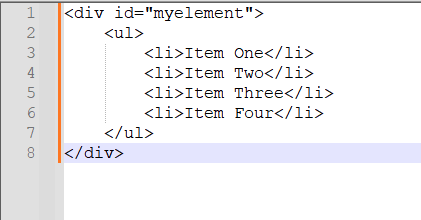
HTML file containing a div with id myelement wrapping an unordered list of four items

  1. In your .js file, include the following code:
if($('#myelement').length == 0) {
    $.get("/" + window.location.pathname.split("/")[1] + "/files/custom/myfile.html", function(data) {
        $(document.body).append(data);
    });
}

Get in Touch

Let us know how we can help you achieve your goals. We’re looking forward to working together.

Cookie preferences

Choose which cookies and similar technologies we may use. You can change this at any time from “Cookie settings” in the footer. See our Privacy Policy.

Cookie categories
Strictly necessary Needed for the site to work and to remember your cookie choice. Always on.
Always on
Helps us understand how visitors use the site so we can improve it.
Used to measure and personalize advertising. We don’t use these today.